



You know that sinking feeling when you find out Billie Eilish just did a surprise show… two blocks away… and you didn’t even know? Yeah — we’ve all been there. The kind of FOMO that has you scrolling TikTok at 2 a.m., watching shaky fan videos from what could’ve been the best night of your life.
- What Is It? Spotify’s New Live Events Feed Explained
- Step-by-Step Guide: How to Use the Hidden Spotify Live Events Tool
- 1️⃣ Open the Live Events Feed
- 2️⃣ Turn On Location Services
- 3️⃣ Search & Follow Venues
- 4️⃣ Filter by Artists & Genres
- 5️⃣ Set Alerts & Notifications
- 6️⃣ Buy or Save Events
- 7️⃣ Troubleshooting Tips
- Pro Tips & Hacks for Spotify’s Hidden Concert Tracker
- Real Fan Wins: The Stalker Feature That Paid Off
- FAQs: Spotify’s Live Events Feature
- Conclusion: Never Miss a Secret Show Again
But what if I told you there’s a way to never miss a secret concert again? Yep — Spotify just rolled out a hidden feature that’s low-key changing the way fans find gigs. It’s not just playlists or “Discover Weekly” anymore — this update is basically your personal concert detective, hunting down Spotify concerts near you and alerting you before anyone else even knows.
This isn’t just another music update. This is your backstage pass — your sneaky little stalker mode that turns your Spotify into a gig-finding weapon. From underground indie pop-ups to surprise arena sets, the new Spotify live events feed is your ticket to catching your idol’s secret show before it’s gone forever.
What Is It? Spotify’s New Live Events Feed Explained
Spotify quietly upgraded what used to be the simple “Concerts Near You” feature — and turned it into something way smarter. The new Spotify Live Events feed combines location-based show listings, venue follows, and ticket links, all inside the app.
Here’s what makes it special:
- You can now follow venues on Spotify — just like following artists. This means you’ll see every new show they announce, instantly.
- The Spotify venue search lets you find specific concert spots, whether it’s the Bowery Ballroom in NYC or The Troubadour in LA.
- You can filter by genre or favorite artists, giving you a personalized list of upcoming concerts Spotify curates for your exact taste.
- Some events even have in-app ticket links, so you can buy directly without leaving your vibe zone.
Basically, Spotify stopped being just a music player — and started acting like your personal live music assistant.
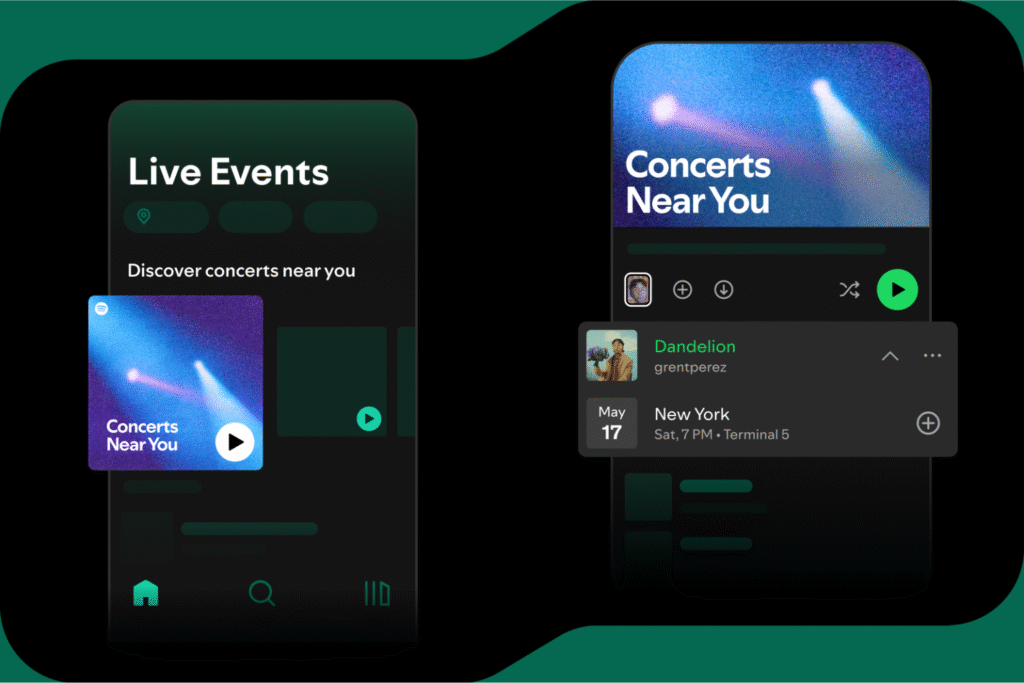
This is the evolution of Spotify concerts near you — from passive playlists to interactive gig-hunting tools.
Step-by-Step Guide: How to Use the Hidden Spotify Live Events Tool
Ready to go full stalker mode (in a good way)? Here’s how to set it up and actually use it to catch your favorite artists before the crowd does.
1️⃣ Open the Live Events Feed
- Open Spotify → Tap Search → Type “Live Events.”
- You’ll find a tab called “Live Events Feed.” This is your control center for all nearby gigs.
2️⃣ Turn On Location Services
Spotify uses your area to generate Spotify concert recommendations.
- Go to Settings → Privacy → Location Services.
- Make sure Spotify has access so it can track local live music Spotify listings automatically.
3️⃣ Search & Follow Venues
Use Spotify venue search to find concert spots in your city. For example:
- “The Bowery Ballroom” (NYC)
- “O2 Brixton Academy” (London)
- “The Fonda Theatre” (LA)
Once you find them, hit Follow. Now, every event they post pops up in your feed.
4️⃣ Filter by Artists & Genres
You can narrow it down by genre (hip-hop, indie, EDM) or your followed artists. This fine-tunes your upcoming concerts Spotify suggestions so they’re hyper-relevant.
5️⃣ Set Alerts & Notifications
Enable push alerts for new Spotify live events near you. You’ll get a ping when a favorite artist or venue drops something new.
6️⃣ Buy or Save Events
Tap an event → choose “Find Tickets.” Spotify links to trusted ticket partners.
Or just Save it — and Spotify will remind you before the date.
7️⃣ Troubleshooting Tips
- No events showing up? Try changing your city manually.
- Location too broad? Zoom in to get better Spotify concert recommendations.
- Venues missing? Some smaller spots take time to appear — keep following updates.
This is the real deal — no more guessing, no more missing out.
Pro Tips & Hacks for Spotify’s Hidden Concert Tracker
Want to level up your concert-hunting game? Try these Spotify hidden features combos and tricks 👇
- 🎧 Pair With “On Repeat” Playlist — See which artists you play most, then stalk their tour schedules in your Live Events feed.
- 📍 Follow Venues on Spotify — Especially local indie spots for underground gigs and local live music Spotify alerts.
- 🕵️♀️ Use Spotify Venue Search Creatively — Search small bars, open mics, or cafes for surprise sets.
- 🗓️ Seasonal Hack: During festival season, follow major venues — Coachella, Lollapalooza, etc. They update constantly.
- 🔔 Turn on All Notifications — Don’t just rely on email. Push alerts come faster.
- 🌎 Travel Trick: Change your Spotify location when traveling — new city, new Spotify live events.
- 💬 Share Events With Friends — Send links directly through Spotify DMs. Build your gig squad.
- 🔍 Cross-check Artists’ Profiles — Some post secret shows only visible through Spotify concert recommendations.
- 🎟️ Bookmark Ticket Links — If you can’t buy right away, Spotify keeps them easy to find later.
- 🤖 Combine With Other Spotify Hidden Features — Like “Blend” playlists to find shared artist tours with friends.
Spotify’s turning every fan into their own mini tour manager.
Real Fan Wins: The Stalker Feature That Paid Off
- Jess, 22 (LA): “I followed The Roxy on Spotify just for fun… and two weeks later, saw a pop-up gig from Olivia Rodrigo. Zero crowd. Total dream.”
- Dylan, 28 (London): “The Live Events feed showed a secret Ed Sheeran pub show. I thought it was fake. Nope — he actually showed. Best £15 I ever spent.”
- Sasha, 19 (NYC): “Using the Spotify venue search, I followed indie venues and caught boygenius before they blew up. Felt like I hacked the system.”
Proof that being a little obsessive (and using Spotify concerts near you) can seriously pay off.
FAQs: Spotify’s Live Events Feature
1️⃣ Is this feature free?
Yes — the Spotify live events feed is free for all users.
2️⃣ Can I buy tickets inside Spotify?
Yes! Spotify partners with major ticketing sites — safe and simple.
3️⃣ Do I need Premium?
No, this works for both Free and Premium accounts.
4️⃣ What if my city doesn’t show events?
Try changing your region manually for better Spotify concert recommendations.
5️⃣ Can I follow more than one venue?
Absolutely — follow as many as you like. The more you follow, the smarter Spotify gets at finding local live music Spotify shows you’ll love.
Conclusion: Never Miss a Secret Show Again
Let’s be real — missing surprise gigs used to be part of the fan struggle. But not anymore. With the Spotify live events feed, you’re plugged into the pulse of your city’s music scene 24/7.
No more FOMO, no more “I wish I knew.” This feature turns your Spotify app into a gig radar — scanning Spotify concerts near you, flagging new upcoming concerts Spotify, and helping you follow venues before the crowd even hears the rumor.
Followed a venue yet? Drop your first discovery in the comments and tag your squad — let’s build the ultimate Spotify live events fan circle before the next secret show vanishes.
🎶 Your idol’s next gig could be two clicks away — better stalk smart.


